
First ride setup
TubeWitch Setup
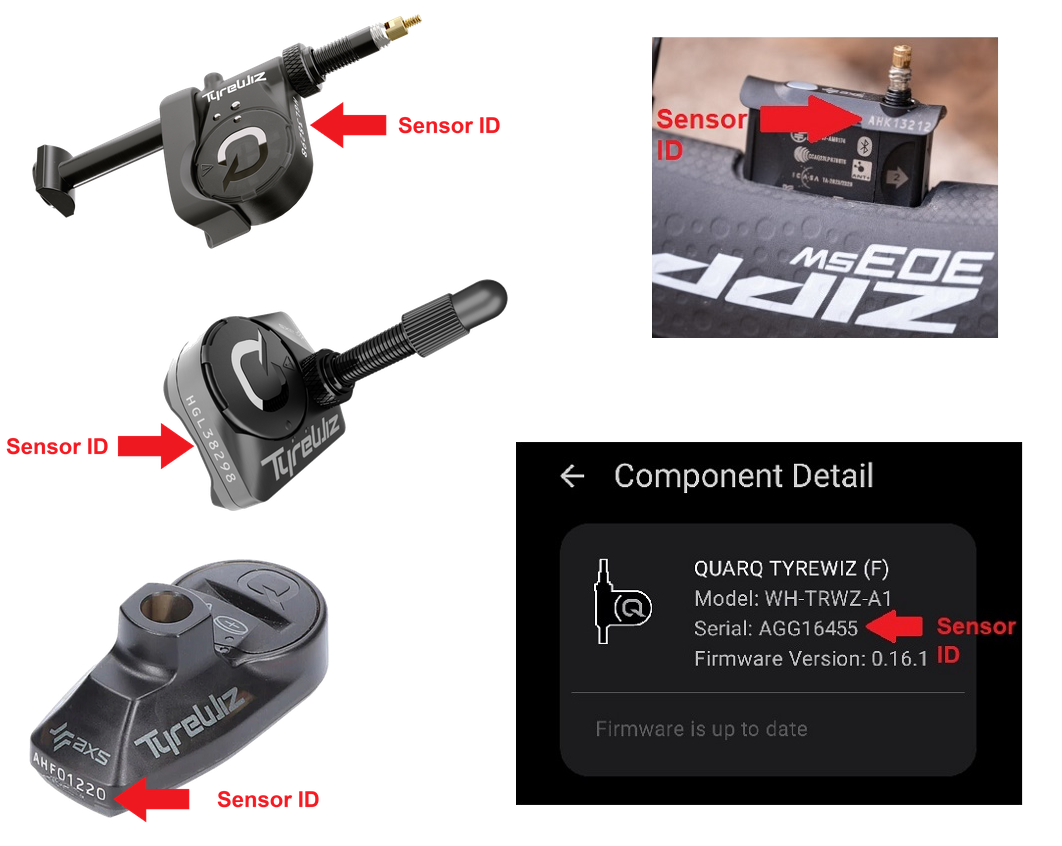
TubeWitch setup is for riders who already own Quarq TyreWiz sensors, Schwalbe AIRMAX sensors, or Zipp wheels with integrated Zipp AXS Wheel Sensors and want that tire pressure data on a Garmin device. TubeWitch stores the sensor IDs and display behavior, while the sensor manufacturer's mobile app controls front / rear sensor positions, pressure targets and sensor firmware.
TubeWitch setup centers on sensor ID entry, device restart, adding the field to a data screen, and confirming live pressure from both wheels before the ride.
Before you start
You need a compatible tire pressure sensor, a compatible Garmin device, the Garmin Connect IQ mobile app, and the sensor manufacturer's mobile app or Garmin Express depending on what you are changing.
- Use Compatible Tire Sensors to confirm the sensor family is supported.
- Use the TubeWitch Garmin App Store page to confirm Garmin device compatibility.
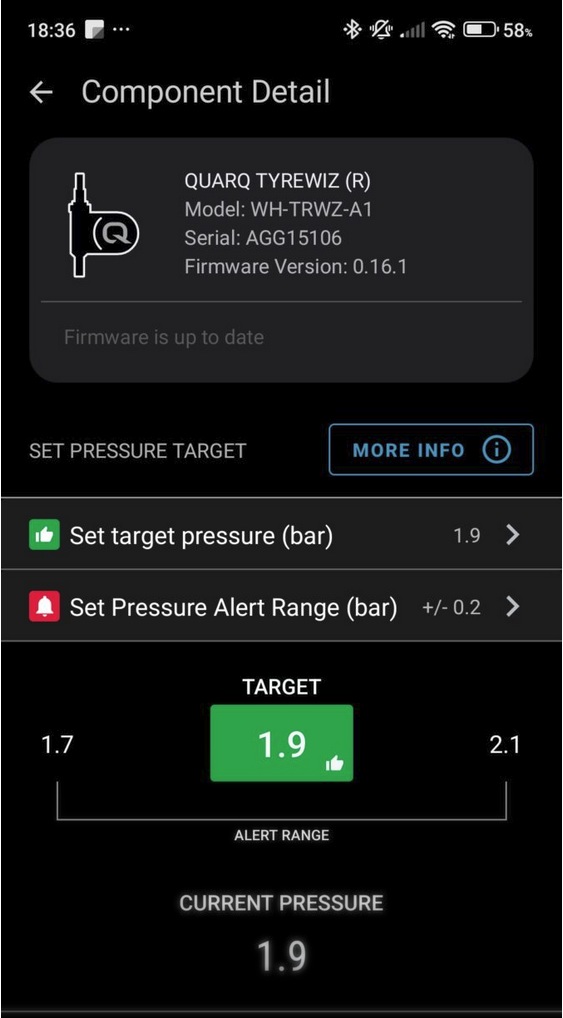
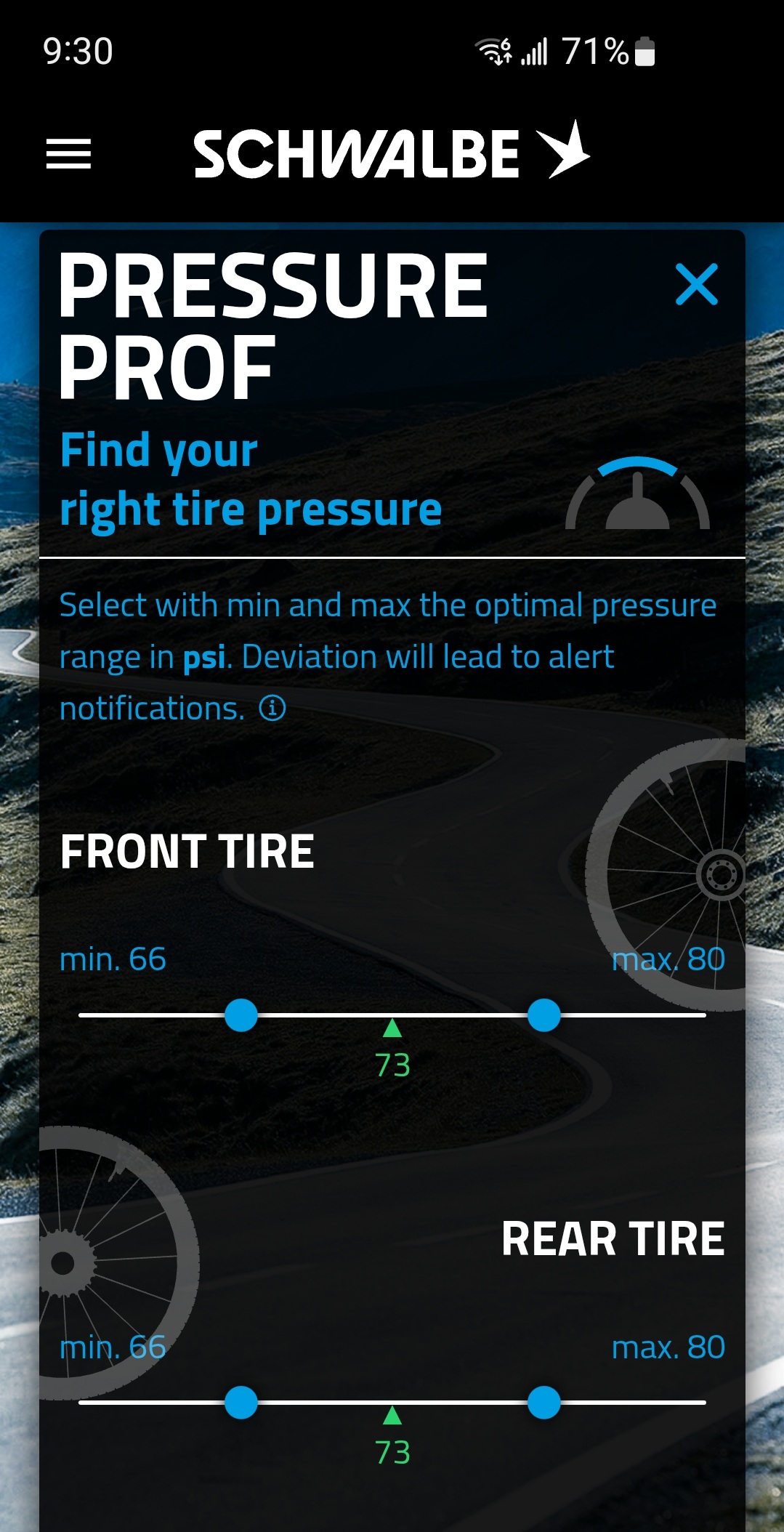
- Use SRAM AXS for TyreWiz/Zipp sensors or the Schwalbe app for AIRMAX to assign the Front / Rear position and pressure target for each sensor.
Setup Steps
- Use the sensor manufacturer's mobile app to assign the Front / Rear position and pressure target for each sensor.
- Install TubeWitch using the Garmin Connect IQ mobile app.
- Fully reboot the Garmin device and restart the Connect IQ mobile app.
- Add the TubeWitch data field to a data screen,
 leave the TubeWitch field visible, and rotate your wheels.
 - In the Connect IQ mobile app, open TubeWitch settings and enter the numeric part of each sensor ID.
- Confirm your live pressures.
See sensor ID entry in motion
These TyreWiz demos show how to open TubeWitch settings in the Garmin Connect IQ mobile app and Garmin Express to enter front and rear sensor IDs.
Enter only the numeric part of each sensor ID in TubeWitch settings. For example, if the sensor ID is HGL12345, enter 12345.
TubeWitch settings in Garmin Connect IQ mobile app
TubeWitch settings in Garmin Express
ALERT: SAVING SETTINGS WITH THE CONNECT IQ MOBILE APP IS AFFECTED BY A BUG IN THE GARMIN IQ SYSTEM. MAKE SURE THE TUBEWITCH DATA FIELD IS VISIBLE ON YOUR GARMIN DEVICE WHEN CHANGING SETTINGS. IF SETTINGS STILL DO NOT SAVE, TRY GARMIN EXPRESS. VIEW CURRENT WORKAROUND
General settings-saving tips
Even when Garmin is working normally, the steps below can help if settings do not save reliably.
First, make sure the TubeWitch data field is visible on your Garmin device before changing settings in the Connect IQ mobile app.
If sensor IDs or other settings are not being saved by the Garmin Connect IQ mobile app, try entering one sensor ID first and saving immediately before entering the second. Garmin's save process can be inconsistent when many settings are changed at once.
Use Garmin Express for the most reliable way to save settings.
What goes in TubeWitch vs. the manufacturer's sensor app
Two separate jobs
- TubeWitch stores the numeric sensor IDs, active sensor set, labels, timeout behavior, and alerts.
- The sensor manufacturer's mobile app is still where Front / Rear assignment, pressure targets, and sensor-specific setup are managed.
- If live pressure appears but high or low status looks wrong, check the pressure target in the manufacturer's mobile app first.
- For multiple bikes or wheelsets, use unique set names to help distinguish sets before using Auto mode.
For TyreWiz and Zipp sensors, SRAM AXS stores the target pressure and alert range in the sensor itself. For AIRMAX, use the Schwalbe app to assign the Front / Rear position and pressure target for each sensor.
If one or both sensors do not connect
Try a Reboot
After install, upgrades, or sensor changes, fully reboot the Garmin device, restart the Garmin Connect IQ mobile app, then double-check the sensor IDs. That solves most setup and startup issues.
Acknowledge open connection prompts
Messages about sensors using open connections are expected during initial setup and appear once per sensor. You must acknowledge each message before data can be received from that sensor. If a sensor is missing data after setup, check the sensor ID then fully reboot the Garmin device to trigger the message again.
Remove competing data fields
If another TyreWiz or TPMS data field is installed, it will block TubeWitch from reading the sensors. Uninstall the other field and reboot.
Need more help?
If setup issues are not addressed on this page, see Troubleshooting for step-by-step fixes or FAQ for common setup and compatibility questions.